Distance, Height & Area Measurements
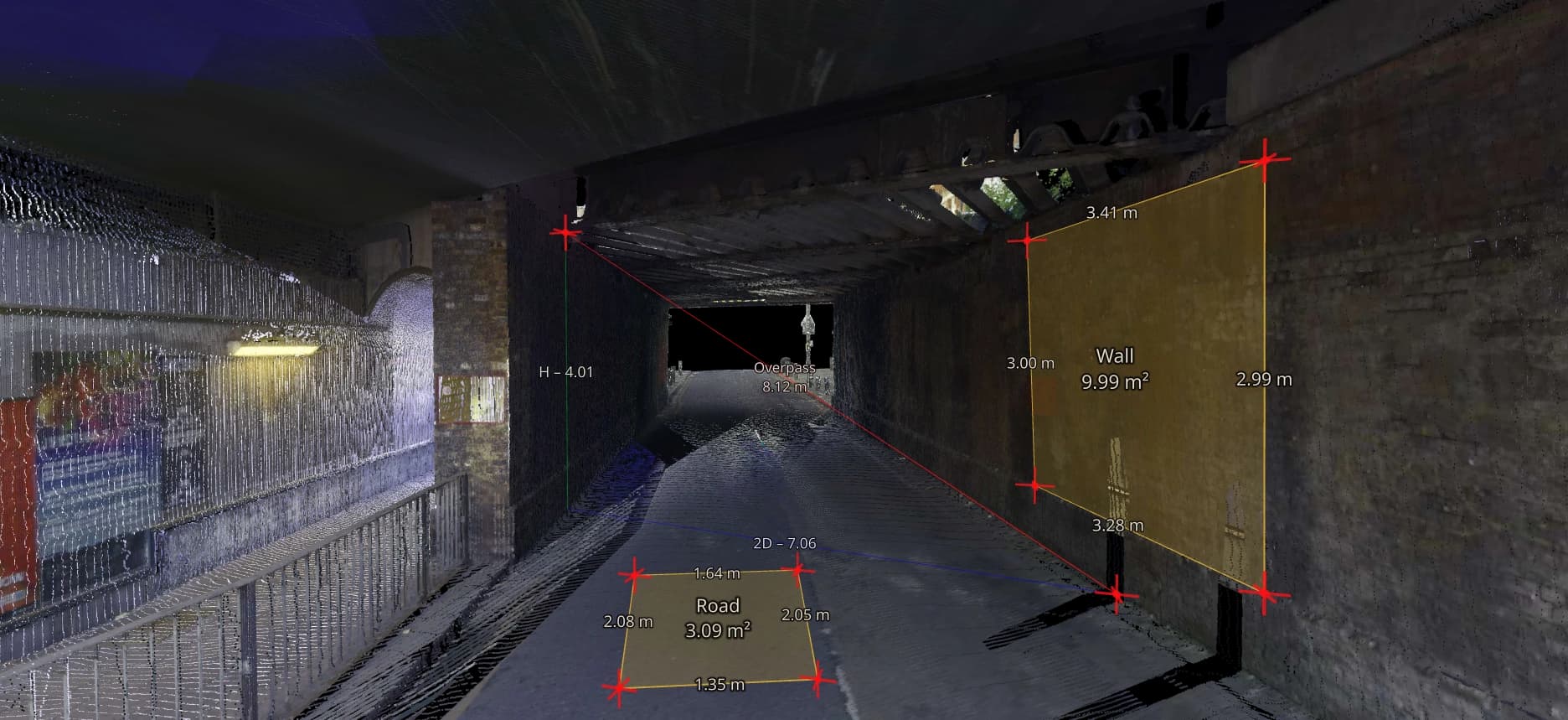
Pick two points on a scan and read the 3D distance with its horizontal and vertical components. Outline a boundary to get an area, or switch to the 2D map and measure in plan over the orthophoto or drawings. It runs in the browser, and a client opening your share link can take the same measurements without an account.
- Measures
- 3D distance, height difference, area
- Views
- 3D viewer and 2D map
- Included in
- Every plan
Distance, height and area tools
Four tools cover most dimension questions on a survey.
3D distance
The straight-line length between two picked points. Use it for spans, openings, setbacks and the distance between features at different levels.
Height difference
Read the vertical component of a distance. Pick a finished floor and the underside of a beam for the headroom, or the top and bottom of a kerb for its upstand.
Area
Outline a boundary on the survey to get its area: a roof, a slab, a paved yard or a room.
Plan measurements
Measure distances and areas in the 2D map, over orthophotos, CAD drawings or WMS layers. Use it when the question is about the plan rather than the 3D shape.
Point cloud measurement accuracy
A measurement is as good as the survey and the two points you pick. The decimal places on the label tell you nothing about accuracy: that comes from the scanner, the registration and how dense the points are where you clicked.
Zoom in before you pick an edge and look at the pick from a second angle. When an edge is hard to read in RGB, switch to intensity or elevation colouring. If a dimension decides whether something fits or gets ordered, have it checked on site.
When to use another tool
The measure tools answer one dimension at a time. Some questions need more than that.
Measure tools are right for
- A span, an opening or a setback
- Headroom and level differences between two points
- The area of a roof, slab or yard
- Quick checks while a client has the same project open
Use a different tool for
- Levels along a route: Elevation Profiles (Pro)
- The volume of a pile: Stockpile Volumes
- A whole wall or floor against design: scan comparison (Pro)
- Cut and fill between two surveys: surface comparison (Pro)
Questions
Can I snap to vector points?
Yes. The built-in snap modes let you measure distances and areas from existing vector points.
Can clients measure the survey themselves?
Yes. Anyone who opens your share link can measure distances, heights and areas in the browser without an account, so simple dimension questions don't have to come back to you.
Is measuring included in the free plan?
Yes. Distance, height and area measurements are part of every Viewer plan, Free included.
Can I rely on a point cloud measurement?
A measurement is as good as the survey and the points picked. The decimal places on the label say nothing about accuracy. If a dimension decides whether something fits or gets ordered, have it checked on site.
Can colleagues see the measurements I take?
Not as live annotations. To point someone to a spot, save a view or add a point of interest. Both stay in the project for colleagues to open.
Try it with your own data
The free plan includes one user and 5 GB of storage, with no credit card required. Upload a file and open it in your browser.