Scan-to-BIM & Deviation Analysis
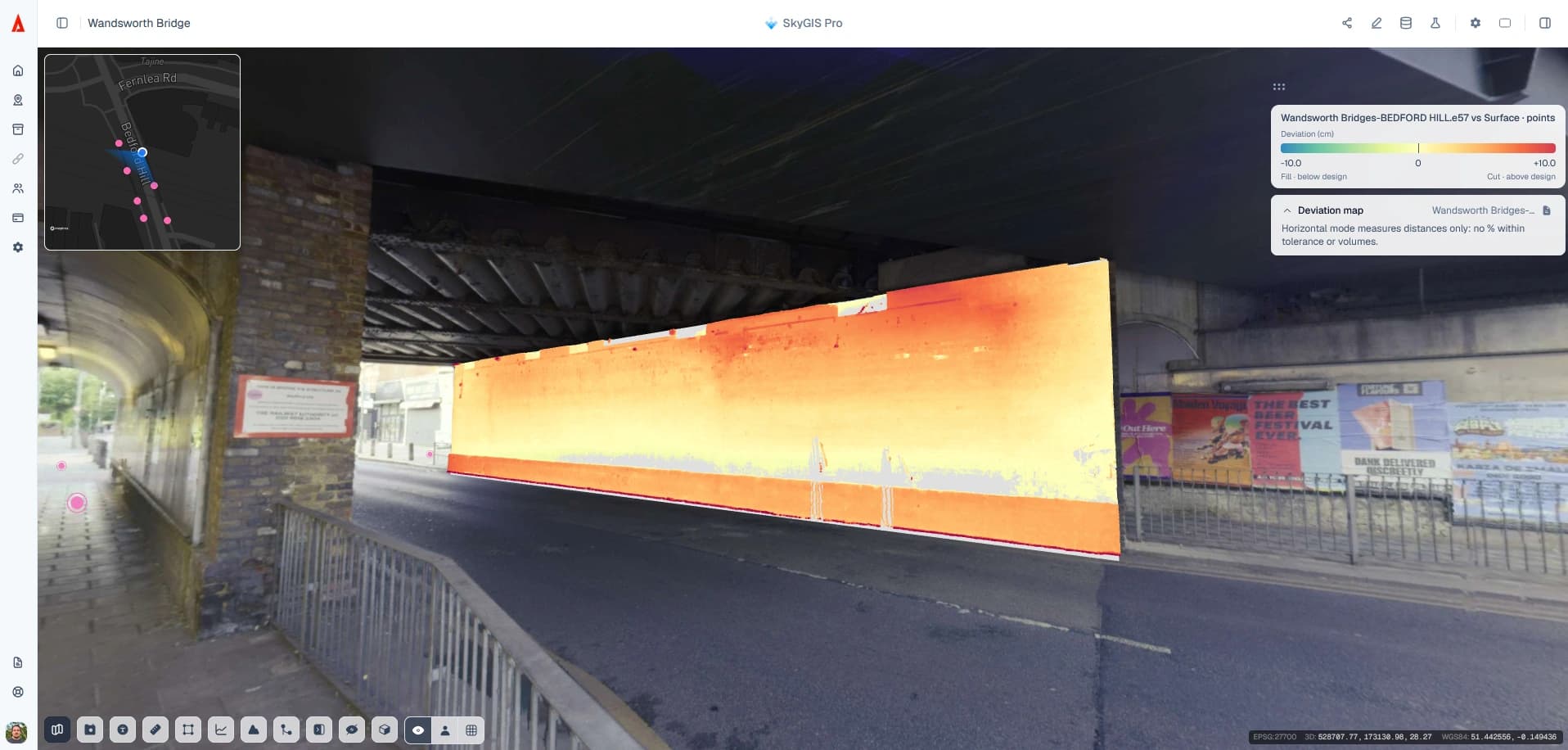
Measure how far the scan sits from what it should be. SkyGIS Pro compares a measured point cloud with an IFC model, a 2D plane, a terrain surface or another scan, and colours every point by its deviation. Out-of-plumb walls, floors that aren't flat, slabs off level and ground that has moved show up as colour on the scan itself, with statistics alongside.
Choosing a reference and distance mode
The reference decides which distance modes make sense. A wall in an IFC model, a floor plane and a terrain surface are different questions.
- Nearest, horizontal
IFC model
For installed work against BIM. Nearest measures to the closest model surface; horizontal measures in plan, which suits near-vertical faces. Vertical and normal modes don't apply to IFC solids.
- Walls, floors, volumes
2D plane
For geometry that should be flat: out-of-plumb walls, floor flatness, or the volume of material above a horizontal plane.
- Vertical, normal
Terrain surface
For ground, formation and level checks. Vertical gives the height difference; normal measures perpendicular to the surface.
- Vertical
Another scan
For change between two captures. The reference scan is gridded and the comparison is vertical, so it answers height-change questions.
Plane deviation: walls, floors and volume above a plane
When the design intent is simply flat, a plane is the quickest reference. Compare a wall with a vertical plane to see where it is out of plumb, or a slab with a horizontal plane to check floor flatness.
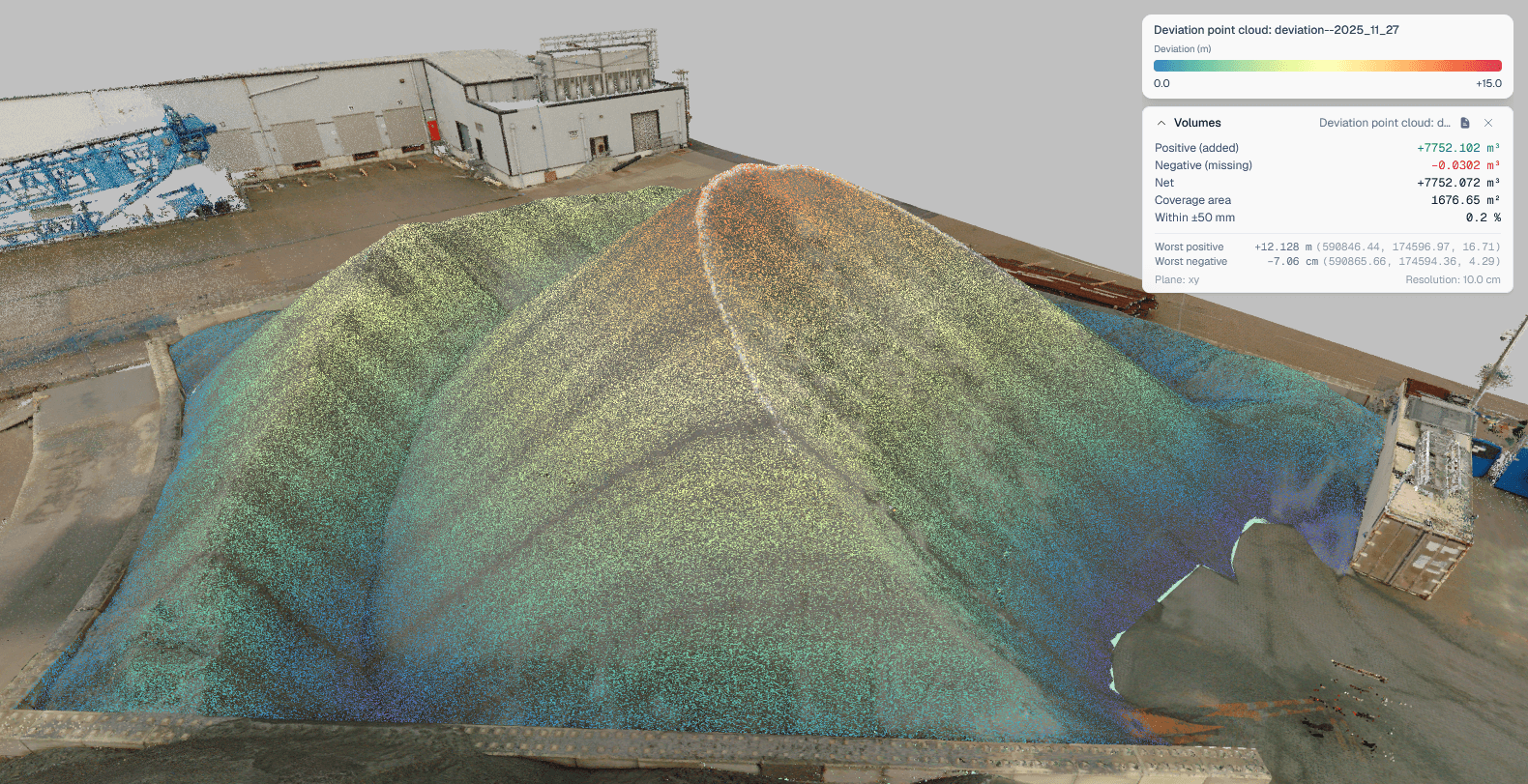
Against a horizontal plane the result also reports volume. In this stockpile example, a comparison with a horizontal (XY) plane at 10 cm resolution gives 7752.102 m³ of positive volume, with net volume and coverage area in the same panel.
Reading a deviation result
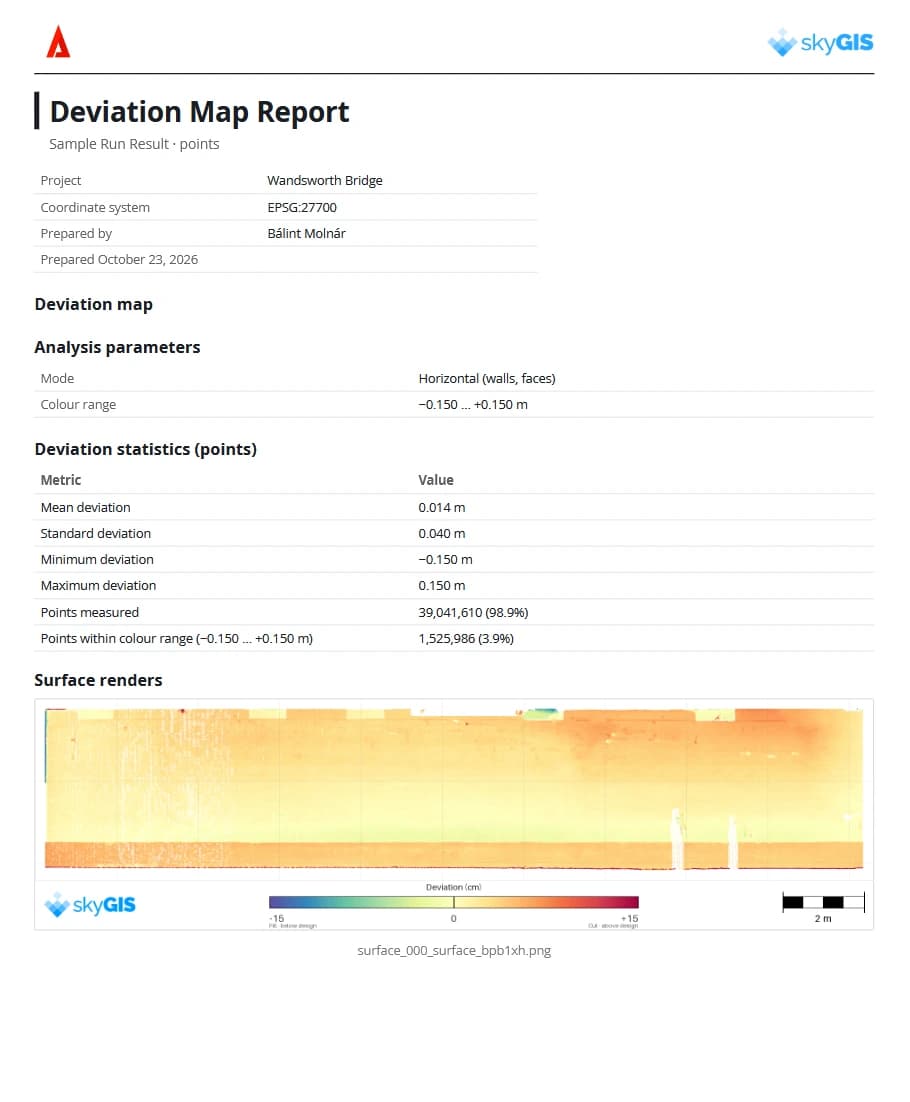
Each point in the result carries its distance to the reference, shown on a colour scale with statistics for the run. Set the scale to the tolerance you care about, so in-tolerance work reads as one colour and the outliers stand out.
Then go back to the source layers wherever something stands out. A coloured patch can be the work itself, the reference you picked, a gap in coverage or a small misalignment between scan and model, and only the source data tells you which.
The result stays in the project as a deviation point cloud next to the source layers, and can go into a PDF report. A deviation run can also carry a surface-match or thickness check, and station quantities when you work along an alignment.
Running a scan-to-BIM or scan-to-scan comparison
Project editors run comparisons.
Line up the data
Scan and reference need to share coordinates and sit where they should. SkyGIS doesn't register them for you.
Pick the cloud and the reference
Select the measured point cloud and the IFC elements, plane, terrain surface or reference scan to compare it with.
Choose the mode and settings
Use a distance mode the reference supports, set the analysis options and run the job.
Inspect and pass it on
Open the coloured result, read the statistics and check outliers against the source layers. Then export or report what the next person needs.
Where scan comparison fits
Use it for
- Checking installed work against an IFC model
- Walls out of plumb and floors out of level against a plane
- Formation and terrain levels against a design surface
- Height change between two aligned surveys
It won't
- Register scans to each other or to the model
- Run vertical or normal modes against IFC solids
- Detect clashes or certify compliance
- Measure full 3D deformation between two scans
Questions
What problems can scan comparison catch?
Walls out of plumb, floors out of level, installed work that doesn't match the model and ground that has moved. Each shows up as colour across the whole scanned surface, with statistics, not only at a few checked points.
Can I compare a laser scan with our IFC model?
Yes. The IFC model is the reference, and every point of the scan is coloured by its distance from it.
Does SkyGIS align the scan to the model?
No. Scan and reference need to be in the same coordinate system and correctly placed first, or the offset shows up as deviation. Ask your surveyor for registered, georeferenced data.
Does a deviation result certify compliance?
No. It measures distance from the reference you chose. It doesn't detect clashes or certify compliance, and an engineer decides what each finding means.
Compare one of your scans with its model
Bring a scan and the IFC model, plane or surface it should match. In a 30-minute walkthrough we'll choose the distance mode with you and run the comparison on your data.