Rail clearance checks from a point cloud
Sweep a clearance profile along the track alignment and find every scanned point that falls inside it. The results come back by station as a chart, a table and a cross-section, so the engineer works through a short list of locations instead of the whole line.
- Inputs
- One point cloud and an alignment with elevations
- Profile
- Chosen or edited by the engineer
- Results
- Chart, table and section by station
Typical job
Finding obstructions before a site walk
A rail survey team has a mobile laser scan of a few kilometres of line and the track alignment from the design. The engineer wants to know where vegetation, structures or lineside equipment come inside the clearance profile, so the site walk can go straight to those places.
They load the scan and the alignment into one project, choose the profile the project requires, set the station range and interval, and check the envelope preview before running. The chart shows which station bins have points inside the envelope, and the section view shows which points and where. If the survey included panoramas, they show what each object actually is.
- Input
- Mobile laser scan, track alignment, clearance profile
- Output
- Affected stations with section evidence
Setting up a clearance sweep
Everything that defines the envelope is set before the run and previewed in the scene, so you can see that it sits where you expect.
- Point cloud
- One source cloud covering the corridor
- Alignment
- The track alignment, with the elevation information the sweep needs
- Clearance profile
- Select a profile and edit it if needed
- Position
- Placed relative to the alignment, with a vertical offset
- Station range
- The stretch of line to check
- Interval
- The spacing of the station bins in the results
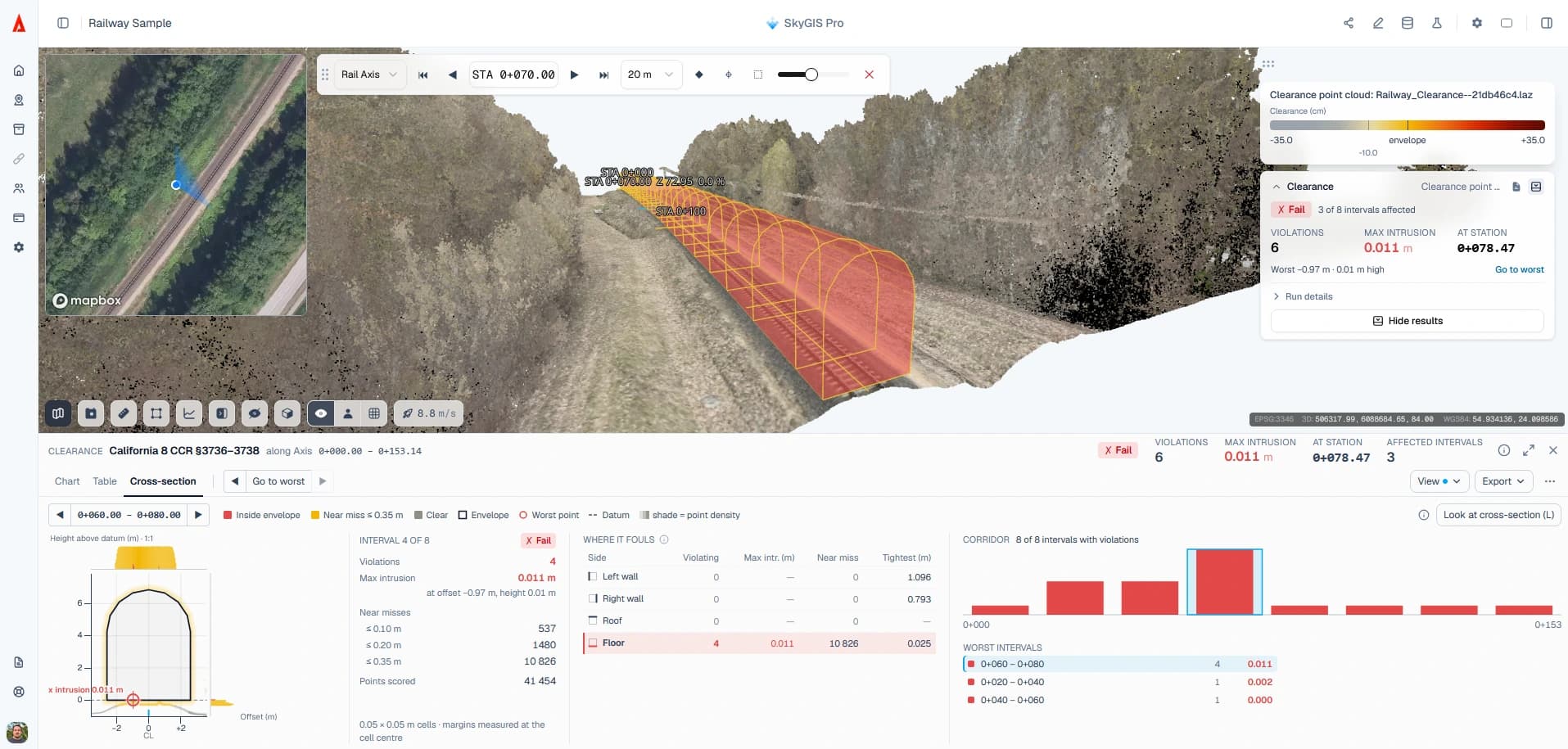
Reading clearance results
Chart
Station bins along the corridor, for spotting which stretches contain points inside the envelope.
Table
The same results station by station, for working through the list one location at a time.
Section
The profile at the selected station, with the scanned points that fall inside it highlighted.
3D scene
The highlighted points in the cloud with the envelope around them. Alignment Walk and a clip box isolate the station so you can measure from the obstruction to the track.
What a clearance sweep can and can't tell you
It shows
- Which captured points fall inside the envelope, and at which stations
- The section geometry behind each finding
- A check you can repeat on the next survey with the same profile, range and interval
It can't
- Prove a stretch is clear where the scan has gaps or shadows
- Simulate vehicle movement or dynamics
- Choose the governing standard or profile for you
- Replace a formal clearance assessment or route approval
Questions
How does clearance analysis speed up a rail survey review?
Instead of checking kilometres of scan by eye, the sweep reports which stations have points inside the clearance envelope. The engineer works through a short list of locations, and the site walk goes straight to them.
Does SkyGIS decide which clearance standard applies?
No. The engineer responsible for the review chooses or edits the profile and decides which requirements govern. SkyGIS sweeps the profile it is given.
Does an empty result mean the route is clear?
Only where the scan has points. Gaps, objects hidden behind others and anything outside the capture aren't tested, and the check doesn't replace a formal clearance assessment or route approval.
Can we repeat the check on the next survey?
Yes. Run the same profile, station range and interval on the next capture to get a comparable result. Clearance analysis is part of SkyGIS Pro.
See it on one of your own datasets
Pro is priced around your team and data volumes. The quickest way to judge it is a 30-minute walkthrough on a dataset you already have.