Point Cloud Elevation Profiles
Draw a polyline over the scan, choose which point cloud to sample and set a buffer either side of the line. SkyGIS plots elevation against distance along the line, so falls, steps and low points along a route show up without building a surface first. Save the profile by name, download a report or export the samples as CSV or GeoJSON.
- Input
- A point cloud and a line you draw
- Exports
- Report, CSV and GeoJSON
Profile inputs and outputs
- Source cloud
- One point cloud from the layers in view. Pick it deliberately when several surveys overlap.
- Line
- A polyline you draw in the viewer along the route.
- Buffer
- The width around the line that is sampled. Only points inside it count.
- Chart
- Elevation against distance along the line, with the number of samples.
- Saved profile
- Named, reopened later and resampled with different settings.
- Report
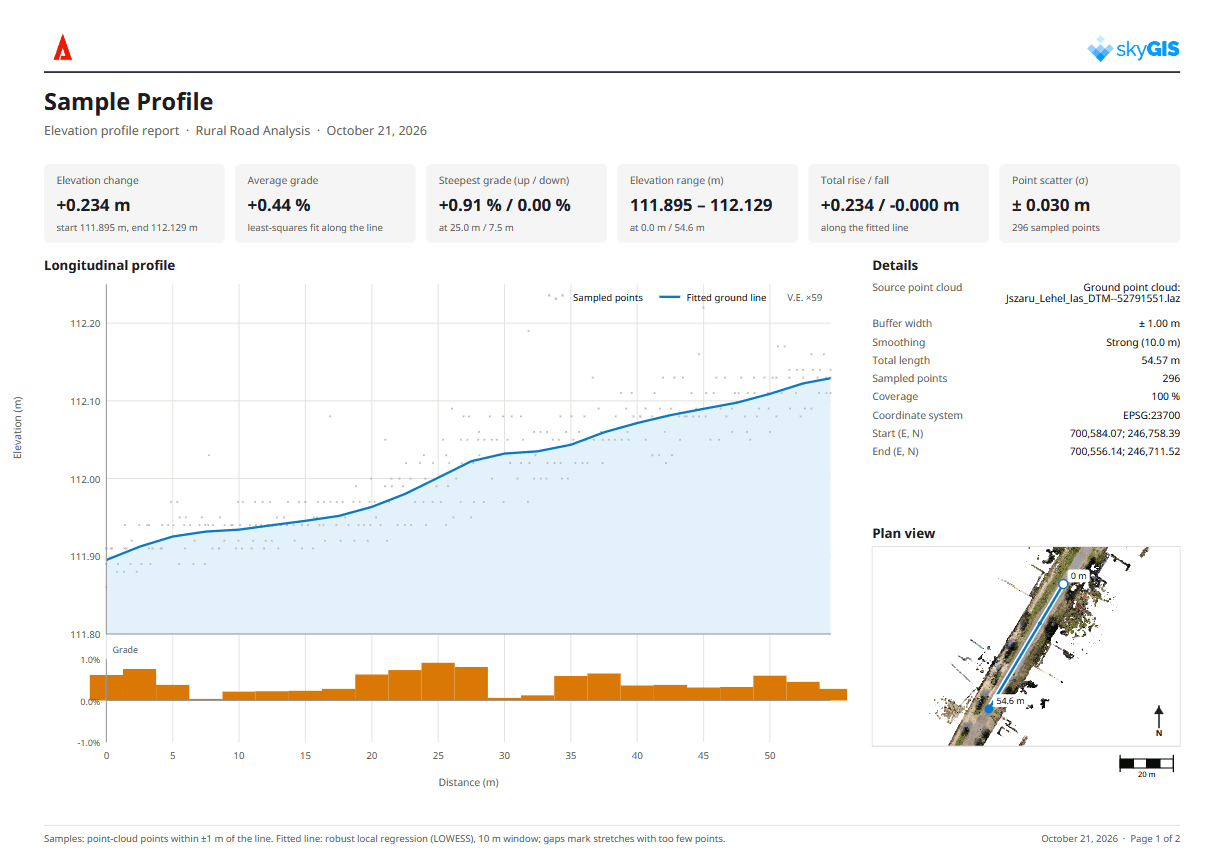
- Sampled points and a fitted ground line, grades, summary statistics, sampling settings and a plan view of the route.
- Data export
- CSV or GeoJSON.
Example
Checking the fall along a haul road
A site engineer wants to know whether a temporary haul road drains towards the gully at its low end or holds water halfway along. They draw a polyline down the wheel track on the latest drone survey, choose a narrow buffer so the verge isn't sampled, and compute.
A dip short of the gully shows up as a low point on the chart, and its distance along the line tells them where to look on the road. They save the profile under the survey date and export the CSV for the site file. After regrading and the next flight, a second profile on the new survey shows whether it worked.
- Input
- UAV point cloud
- Output
- Saved profile and CSV
Choosing the sampling buffer
The buffer decides which points count. A narrow buffer down a footpath gives you the path. A wide one starts to take in the kerb, the verge or a wall alongside, and the chart shows those heights too.
Where a line runs under trees, beside a facade or through a structure with several levels, keep the buffer tight and check in 3D which surfaces fall inside it.
In the report, a fitted ground line makes the overall fall easier to read while the sampled points remain visible. Read the line alongside the point scatter and coverage, especially when checking a small step or low point.
Elevation profile or corridor cross-section?
Both show levels along or across a line. They answer different questions.
Elevation profile
- Samples one point cloud along a line you draw
- Works anywhere: roads, ditches, roofs, floors
- Needs no design data or alignment
- Download a report or export CSV and GeoJSON
Corridor cross-sections
- Follow a project alignment by chainage
- Compare design and measured sections at each station
- Shade cut and fill on each section
- Export section profiles to DXF
Questions
What questions does an elevation profile answer?
Whether a road, ditch, roof or floor falls the way it should, and where the low points and steps are along a line. It works straight from the scan, with no design data or surface to build first.
Can I share profile results with people who don't use survey software?
Yes. Download the report to share the profile chart, grades, summary statistics and plan view together. Export CSV to chart the samples in a spreadsheet, or GeoJSON to take the line into a GIS.
Can I check whether remedial work fixed the problem?
Yes. Profiles are saved by name, so after the next survey you can draw the same line on the new capture and compare the two.
Is the elevation profile tool in SkyGIS Viewer?
No. Elevation profiles are part of SkyGIS Pro. Viewer includes distance, height and area measurements.
Draw a profile on your own survey
Bring a point cloud you already have to a 30-minute walkthrough and see a profile drawn, sampled and exported on your data.