Surface Comparison & Cut/Fill Volumes
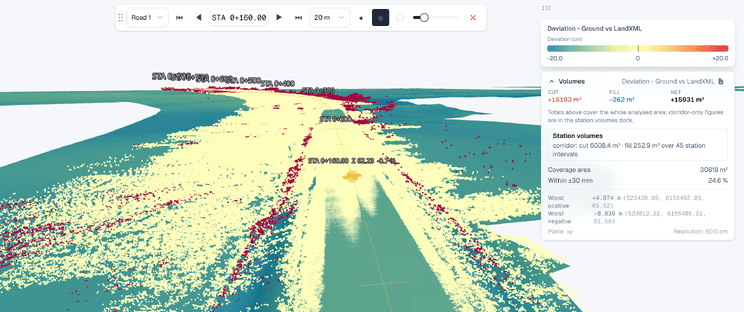
Put two surfaces on the same grid and SkyGIS Pro works out the difference: where one sits above the other, by how much, and the cut and fill volumes that adds up to. Compare a LandXML design with another LandXML or with a drone or laser survey, or compare two surveys with each other. The totals come with the cut and fill geometry in 3D, so anyone questioning a number can see where it comes from.
- Compares
- LandXML and point clouds, in any pairing
- Sign convention
- Top minus bottom. Positive is fill.
- Area
- Whole footprint or a boundary
Surface pairs, settings and outputs
- LandXML to LandXML
- Cut and fill volumes, plus a 3D difference model
- LandXML to point cloud
- Cut and fill volumes, for example a design against a drone or laser survey
- Point cloud to point cloud
- Cut and fill volumes between two surveys
- IFC design
- Extract the design surfaces to LandXML, then compare
- Surfaces
- Choose which surfaces in each input take part
- Grid
- A common XY grid at the resolution you set
- Calculation area
- The full footprint, or a boundary imported from a file or drawn in the viewer
- Along an alignment
- Optional cut and fill per station
- Deliverables
- PDF report, and DXF export of cross-sections and 3D surface models
How cut and fill is calculated
Both inputs are sampled as height surfaces on a common XY grid, and at each cell SkyGIS subtracts the bottom surface from the top one. Positive differences make up the fill bodies, negative ones the cut bodies.
So the roles matter. With the later survey on top and the earlier one at the bottom, fill is material placed and cut is material removed. With the design on top and the survey at the bottom, the result reads like an earthworks plan: cut is ground still to come out, fill is ground still to be placed.
Grid resolution changes the result. A coarse cell smooths over edges and small features, and a fine one can't add detail the survey doesn't have. Pick a cell size that suits the source data, and keep it the same between runs you want to compare.
Typical job
Monthly cut and fill on a road cutting
A site team gets a UAV survey of a road cutting every month. Each one goes into a date-stamped folder in the same project, next to the LandXML design surface and the alignment.
Two comparisons cover the monthly report. This month's survey on top of last month's gives the cut and fill actually done in the month. The design on top of this month's survey gives what is left. Both runs use the same grid resolution and the same boundary, drawn around the active work zone.
With the alignment switched on, the run also breaks down by station, and the PDF report goes to the commercial team with the totals and the geometry behind them.
- Progress
- Later survey (top) vs earlier survey (bottom)
- Remaining
- Design (top) vs latest survey (bottom)
- Kept in
- One date-stamped folder per survey
Surface comparison or scan comparison?
Two Pro tools measure differences. They answer different questions.
Surface comparison
- Gridded height difference between two surfaces
- Cut and fill volumes and totals
- LandXML and point clouds in any pairing
- Cut and fill per station along an alignment
Scan comparison
- Distance from each scan point to a reference
- IFC models, planes, terrain surfaces or another scan
- Walls, columns and other vertical geometry
- Point-level heat maps and statistics
Questions
What can surface comparison be used for?
Progress quantities against design, material moved between two surveys and what's left to excavate. Compare a design with a survey, two design revisions or two surveys of the same site.
Can I show the commercial team where a volume comes from?
Yes. Totals come with the cut and fill geometry in 3D and a PDF report, so anyone questioning a figure can see the ground behind it.
Can I compare a LandXML design with a drone survey?
Yes. Design against a drone or laser survey is one of three pairings, alongside design against design and survey against survey.
Can surface comparison calculate volumes between IFC solids?
No. It compares height surfaces, not BIM solids, and it isn't a clash check. Design surfaces in an IFC model can be extracted to LandXML and compared from there.
Run cut and fill on two of your surfaces
Bring a design and a survey, or two surveys of the same site. In a 30-minute walkthrough we'll compare them and go through the totals, the geometry and the coverage together.