Calculate stockpile volume from a point cloud
Draw around a pile in the point cloud and SkyGIS calculates its volume above a fitted base, plus an estimated mass if you give it a density. It works on any survey you've uploaded, from a drone flight to a terrestrial scan, and it's part of SkyGIS Viewer.
- Volume
- Above a fitted base plane
- Mass
- From a density you pick or enter
- Needs
- A point cloud in a projected, metre-based CRS
Measuring stockpile volume step by step
Draw the perimeter
Click around the toe of the pile on the point cloud. The perimeter sets the footprint, so keep it on the ground just outside the material.
Set the sampling
Choose a cell size and sampling quality for the calculation.
Add a density
Pick a material or enter your own density to get an estimated mass next to the volume.
Check and save
Look at the height columns, sampled coverage and fitted base, then save the result. If something looks off, adjust the perimeter or sampling and recompute.
What the volume is measured from
The volume is everything between the sampled pile surface and a base plane fitted for the calculation. That plane is an assumption, not a survey of the ground under the pile. On a flat yard it's easy to check; on a pile tipped into a hollow or against a wall, it deserves a closer look.
Coverage matters just as much. Gaps in the scan, such as the far side of a pile pushed against a wall, affect the estimate, and the coverage view shows where they are.
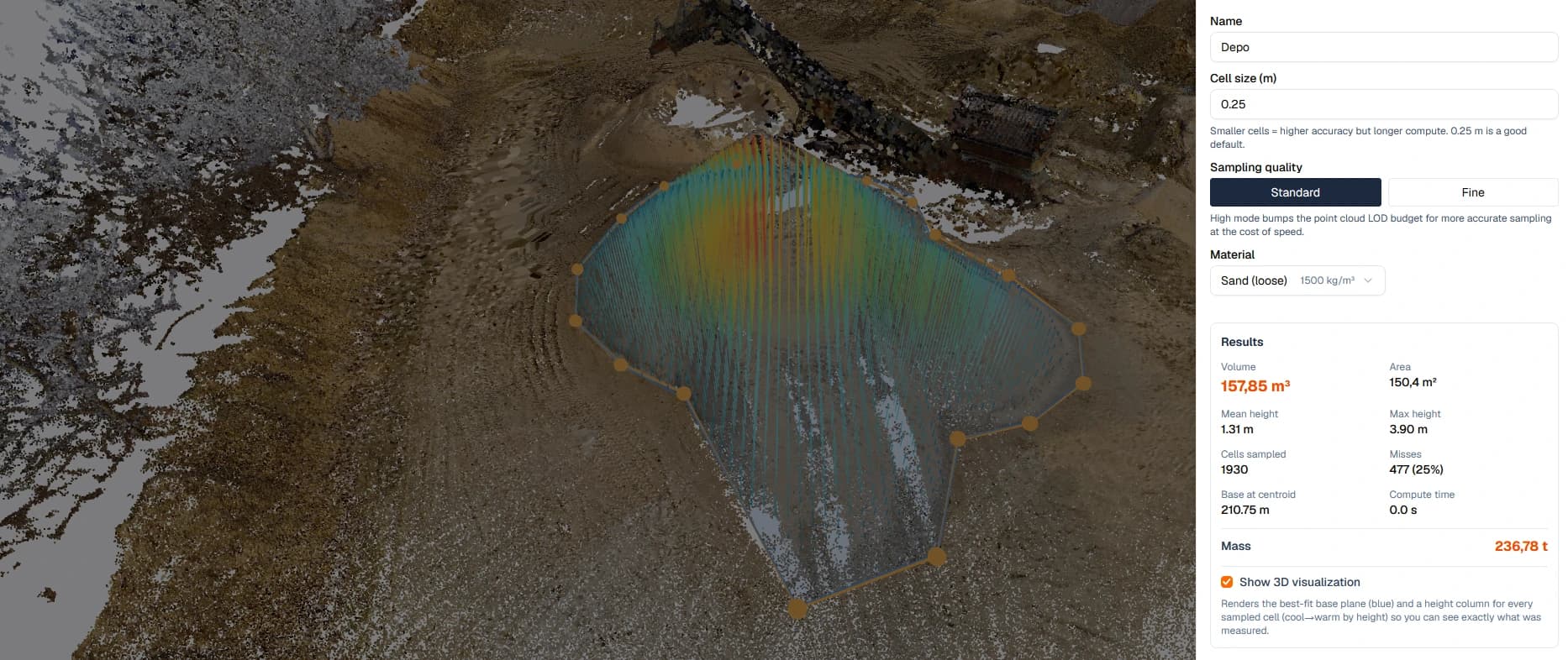
Before you use the number
- The survey covers the whole pile and the ground around its toe
- The project uses a projected, metre-based coordinate system
- The perimeter follows the toe of this pile, not a neighbouring one
- The fitted base looks like the floor the pile actually sits on
- The density suits the material, its moisture and its compaction
- The survey date and density are recorded with the result
Viewer or Pro for stockpiles?
The stockpile tool covers most single-pile estimates. Pro adds other ways to get the volume and a report to send.
SkyGIS Viewer
- Draw a pile perimeter on the point cloud
- Volume above a fitted base plane
- Mass from a chosen or entered density
- Save the result and recompute later
- Repeat surveys filed by date in one project
SkyGIS Pro adds
- Start from an existing polygon or surface instead of drawing
- Volume by deviation against a horizontal plane you define
- Surface difference between two surveys for material moved
- PDF reports for deviation and surface-difference results
Questions
Do I need specialist software to measure stockpiles?
No. The stockpile tool runs in the browser and is part of SkyGIS Viewer. Anyone on the team can draw around a pile on an uploaded survey and get its volume and an estimated mass.
Can I report stockpiles in tonnes?
Yes, as an estimate. Pick or enter a material density and SkyGIS converts the volume to mass. Moisture and compaction change the real figure, so agree the density with whoever relies on the number.
Does it work with drone surveys as well as laser scans?
Yes. Drone photogrammetry or LiDAR, terrestrial scanning, mobile mapping and SLAM all work once exported to LAS, LAZ, E57 or ASCII, so you don't need to change how you capture.
How far can I rely on the figure for stock reporting?
As far as the survey and settings behind it. The volume is measured above a fitted base, not the surveyed ground beneath the pile, so record the survey date, perimeter and density with each figure.
Try it with your own data
The free plan includes one user and 5 GB of storage, with no credit card required. Upload a file and open it in your browser.